.png)
InvestCloud Wealth Management
A unified digital platform empowering Account Managers, Security Analysts, and Recon
Analysts to manage wealth with data-driven intelligence and seamless digital experiences.
UI design
Ux design
Case study
PROJECT OVERVIEW
Duration -
6 months
Role -
UI/UX Designer
Tool -
Sketch, Figma, Miro
Client -
InvestCloud
User Group -
Account manager,
Security anlysts and
Recon Analysts
ROLES & RESPONSIBILITIES
Scope of work -
User research, User interviews, Online surveys, Competitive analyses & Heuristic evaluation, Customer journey map, User persona, Information archite-cture, Wireframing, Prototyping, Design system.
Team -
UI/UX Designer, product Manager, Engineers
PROJECT BACKGROUND
InvestCloud is a cloud-based platform for financial advisors and portfolio managers. The project aimed to redesign key workflows — like account maintenance, event handling, and restriction management — which were previously fragmented, redundant, and difficult to use.
Our goal was to simplify these experiences, reduce cognitive load, and improve clarity, while preserving the platform’s enterprise-grade sophistication.
Understanding the Users
-
Account Managers
-
Handle client portfolios and account maintenance.
-
Oversee account activities and ensure client goals align with investments.
-
-
Security Analysts
-
Monitor asset performance and risks.
-
Validate data accuracy and security compliance.
-
-
Reconciliation (Recon) Analysts
-
Match financial data between internal systems and external records.
-
Ensure every transaction is accurate and consistent.
-
PROBLEM STATEMENT
InvestCloud is a powerful wealth management platform used by account managers, security analysts, and recon analysts. Despite its robust features, users faced several key challenges:
Fragmented Workflows: Actions like account suspension, reactivation, or applying restrictions required navigating through multiple disconnected screens.
Lack of Clarity: Users had difficulty identifying the status of accounts or events, with limited feedback or confirmation indicators.
Redundant Actions: Repetitive tasks and duplicated input led to inefficiencies and errors in managing accounts and restrictions.
Inconsistent UI Patterns: Pop-ups, inconsistent navigation, and hidden actions contributed to a steep learning curve and user frustration.
Legacy Application/ Old UI

GOAL
The goal of this project was to redesign and simplify core workflows within the InvestCloud platform for Account Managers, Security Analysts, and Recon Analysts. The previous system was fragmented, leading to confusion, redundant actions, and increased user errors. We aimed to unify account event and restriction flows, improve visibility into account statuses, and create a more intuitive, consistent user interface. By introducing a streamlined design system and clear interaction patterns, the objective was to enhance user confidence, operational speed, and reduce onboarding complexity—ensuring a seamless experience aligned with the platform’s enterprise-grade functionality.
DESIGN PROCESS
It always starts with people
The redesign of InvestCloud began with conversations. We conducted interviews with account managers, recon analysts, and security analysts to uncover pain points in their daily workflows. These stakeholders provided insights into challenges like navigating inconsistent UI flows, difficulty in tracking event statuses, and managing multiple account states such as suspended or active. A total of 6 semi-structured interviews and 2 observational sessions were carried out.
Building through empathy
We synthesized findings into empathy maps that highlighted user behaviors, thoughts, frustrations, and needs.
Account managers, for example, expressed a need for better visibility into account status changes and audit trails.
Recon analysts felt overwhelmed by inconsistent feedback during trade validation, and
Security analysts needed more control over restriction application workflows.
These insights helped us connect emotionally with users and understand not just what they do, but why they do it.
INSIGHTS
Users frequently switch between multiple tabs and re-enter the same data across screens, leading to frustration, inefficiency, and increased chances of human error during critical tasks like restrictions or reactivations.
The system provides minimal confirmation or visual cues, leaving users uncertain whether actions were successful or if they missed a key update—causing hesitation and mistrust in executing operations.
Users are eager for a more intuitive, enterprise-grade experience with fewer clicks, better navigation, and smarter automation—so they can focus on accuracy and speed without feeling overwhelmed.

USER PERSONA

MOSCOW method
We used the MOSCOW method to prioritize features based on their impact on user pain points like redundant processes, unclear feedback, and poor visibility. This helped us focus on high-impact improvements that would enhance efficiency, reduce manual errors, and bring clarity to account management and restriction workflows.
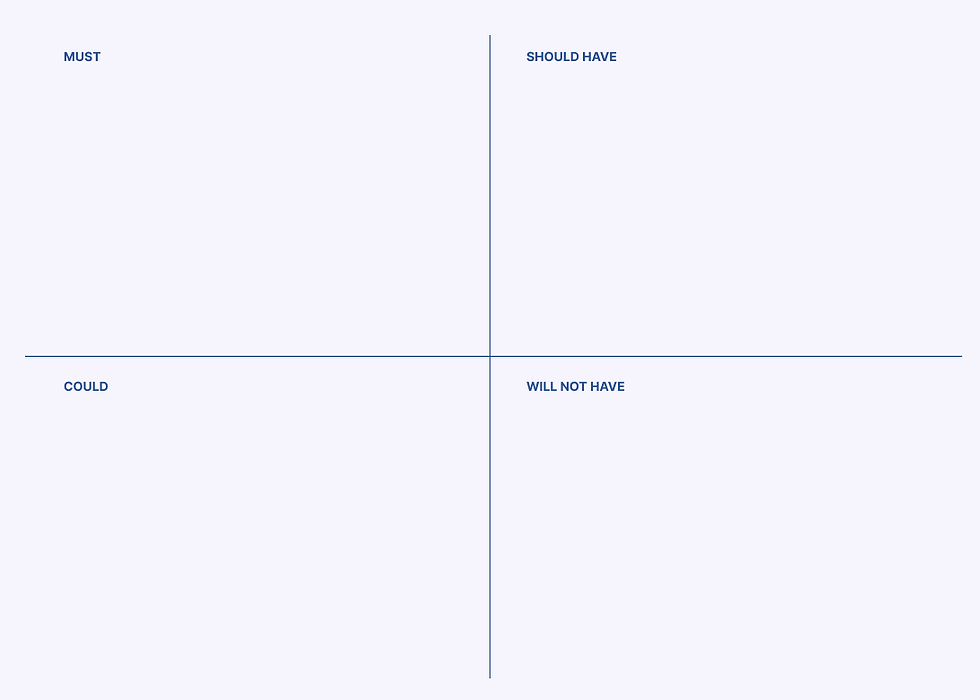
The system must support seamless workflows for suspending, reactivating, and updating account restrictions—all within a single, streamlined interface to reduce complexity and ensure compliance.
Users must have real-time visibility into account status, flags, and transaction events, along with immediate system confirmations to reduce errors and support faster decision-making.
The interface should adapt to different user roles—Account Managers, Security Analysts, Recon Analysts—by surfacing relevant tools and workflows, reducing clutter and improving operational efficiency.
The platform should notify users about key updates like status changes, failed actions, or pending reviews, enabling faster response times and preventing missed steps in critical workflows.
Embed contextual help, walkthroughs, or tooltips for complex workflows like restriction building or event setup, reducing onboarding time and supporting less experienced users without formal training.
Allow users to customize dashboards, reorder tabs, and set default views to match their daily workflows, improving speed and comfort without impacting the core system structure.
This phase will not include integration with external compliance systems or a mobile version of the tool, as these require additional infrastructure and are not critical to core workflows.
USER JOURNEY
-
Sign In
The user securely logs into the InvestCloud Wealth Management platform using their credentials. -
Dashboard
Upon login, the user arrives at the Dashboard which provides an overview of account statuses, event aging, securities, and AUM summaries for quick situational awareness. -
Saved Searches
The user selects a predefined “Saved Search” to quickly access relevant sets of accounts, improving workflow efficiency and minimizing repetitive filtering. -
Account Details / Maintenance
From the search results, the user navigates to the Account Maintenance screen to view and select specific accounts requiring action or review. -
Account Details – 100111 (Pre-IGO)
The user drills into Account 100111, reviewing its summary and status information before initiating a Pre-IGO (Initial Group Onboarding) process. -
Pre-IGO – Event Builder
Using the Event Builder, the user configures and launches necessary events (e.g., onboarding workflows or model assignments) tied to Account 100111. -
Account Details – 704550 (Suspended)
The user switches to Account 704550, which displays a Suspended status. They assess reason codes, restrictions, and reconciliation status. -
Suspended – Event Builder
The user triggers necessary reinstatement or update events to modify or lift the suspended status through the Event Builder. -
Active Status – Event Builder
After reactivation, the user confirms the account's Active status and may perform follow-up actions like cash reconciliation or advisor reassignment. -
Restriction Builder
The final step involves managing or reviewing restrictions applied to accounts — such as "Do not trade" or "Do not buy" rules — within the Restriction Builder module.


INFORMATION ARCHITECTURE
After analysing and detailed study of the user’s needs and prioritising the service, features required to them, the information architecture was built,


FINAL DESIGN
The redesigned InvestCloud platform establishes a unified digital environment where Account Managers, Security Analysts, and Recon Analysts can seamlessly collaborate through automated, role-based workflows.
By streamlining account management, compliance validation, and reconciliation into a single connected system, the solution delivers:
-
Clear visibility across all operational stages
-
Reduced manual intervention through event-driven automation
-
Improved accuracy via synchronized data and audit trails
-
Enhanced user experience with intuitive dashboards tailored for each role
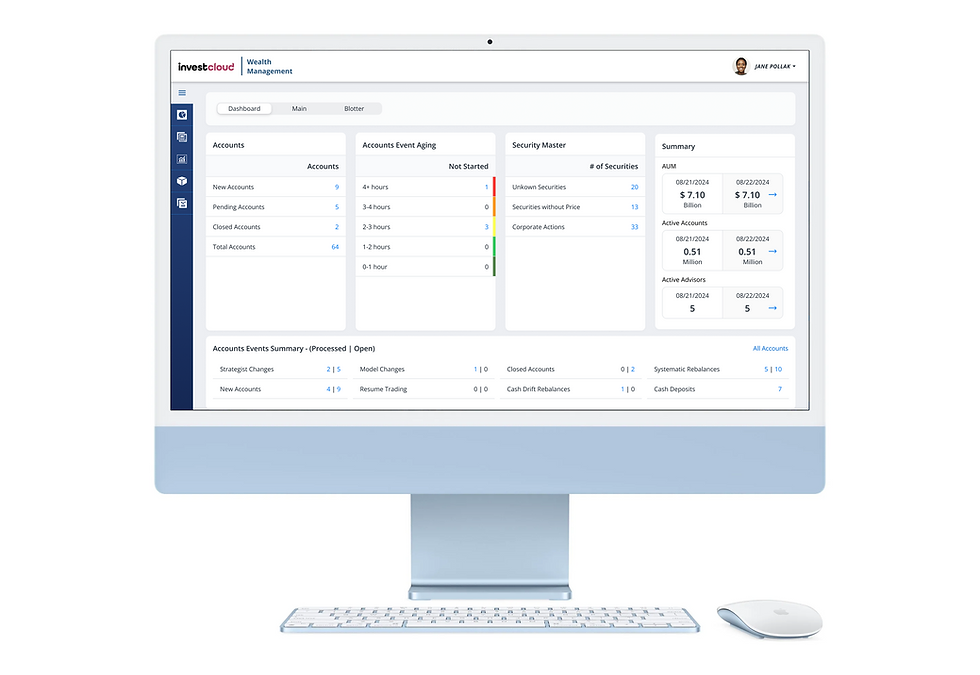
Dashboard
The InvestCloud Dashboard offers a concise overview of key account and portfolio data for wealth management professionals. It includes:
-
Accounts Summary: Displays totals for new, pending, and closed accounts.
-
Event Aging Tracker: Visualizes how long account events have remained unstarted.
-
Security Master: Lists counts of unknown securities, securities without prices, and corporate actions.
-
Performance Summary: Shows AUM, active accounts, and advisor counts across dates.
-
Account Events Summary: Tracks the status of various operational events (e.g., strategy changes, model updates).

Account Details/Maintenance
The Account Maintenance screen provides a centralized view for managing account-level data. Users can select multiple accounts, review key fields (like billing dates, model IDs, and UMA indicators), and perform bulk actions such as applying restrictions, initiating events, or updating fields using tools like Fill and Find & Replace. From here, users typically proceed to View Account Details for deeper insights or to trigger Event workflows like reactivation or restriction updates. This screen streamlines maintenance tasks and acts as the starting point for critical back-office operations.

Active Status
The Active Status on the Account Details screen indicates that the account is currently operational and not restricted or suspended. This status allows account managers and analysts to proceed with regular financial activities like trading, reconciliation, and restriction management. It also signals that no compliance holds or workflow interruptions are currently in effect for this account. This clarity helps users make informed decisions without unnecessary backtracking.
Restriction Builder
The Restriction Builder allows users to view and manage trading restrictions associated with a specific account. This view presents detailed rows for each restriction, including rules like “Do not Trade” or “Do not Buy,” associated securities, expiration status, and source (e.g., Account or Home Office). It enables compliance and account managers to track active constraints efficiently and ensure alignment with internal policies. The tabbed layout (“View,” “Manage,” “Add”) makes it easy to navigate between reviewing current restrictions and modifying or adding new ones, offering clarity and control in managing regulatory and strategic boundaries.
ALL SCREENS


Thanks for checking out this project!
See how I tackled a different design challenge in other projects. Let me know what you think! I'm always looking for feedback."